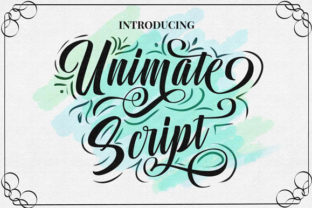
Unimate: A Script Font That Brings Warmth and Craft to Your Creative Work
Every designer knows the feeling: you have a clear vision for a project—something friendly, personal, and full of character—but the perfect typeface remains elusive. You scroll through lists of script fonts, but many feel too rigid, too formal, or lack that special touch that turns a simple word into a memorable statement. Unimate was crafted to fill that gap. It is a beautiful script font that pairs flowing letterforms with cute clipart and amazing swashes, helping you create designs that feel hand-finished and genuinely inviting. Whether you are working on wedding invitations, uplifting social media posts, product packaging, or a heartfelt brand identity, Unimate offers the versatility and charm you need without requiring hours of manual customisation.
The Real Challenge Behind Finding a Warm Script Font
Script fonts promise approachability, but the reality on screen often disappoints. Many options fall short in three key areas: they lack natural flow, they offer few or no alternative characters, and they feel disconnected from the overall visual message. When a script font has no ligatures or swashes, every repeated letter looks identical, which can make a design feel mechanical rather than hand-lettered. Additionally, most fonts arrive as a bare set of letters with no decorative elements, forcing designers to hunt for separate illustrations that may not match the line weight or style of the text. This mismatch can drain time and dilute the cohesive look you want to achieve.
Unimate addresses these pain points directly. It was developed with a clear understanding that a script font should do more than just look pretty at first glance—it should give you the tools to sustain that beauty across an entire project. The included cute clipart works harmoniously with the lettering, and the amazing swashes transform simple headings into expressive focal points. Instead of spending energy compromising or patching together assets from different sources, you can keep your focus on the message and composition.
How Unimate Supports Your Design Goals
Think of Unimate as a creative partner that helps you convey emotion through type. The font excels in projects where you want to communicate sincerity, celebration, or a touch of whimsy. Because it blends smooth strokes with playful detail, it naturally suits several common design needs:
- Invitations and stationery: Wedding suites, birthday cards, and baby shower announcements gain an instant lift from the flowing letters and coordinated ornamentation. The swashes can be used to emphasise names or dates, while the clipart adds gentle illustration without crowding the layout.
- Branding for small businesses: Bakeries, florists, cafés, and boutiques thrive on a personal connection with their customers. Unimate helps you build logos, shop signs, and tags that feel handcrafted and genuine, setting the business apart in a marketplace full of cookie-cutter visuals.
- Social media and digital content: Posts that aim to inspire, comfort, or engage often benefit from a softer, handwritten feel. Layering Unimate’s characters over images or using short quotes with swashes can increase shares and reactions because the design feels more direct and human.
- Crafting and DIY projects: From mug designs to scrapbook titles, the font and its clipart give hobbyists a polished look without needing advanced illustration skills.
Across all these applications, the consistent line quality between letters, swashes, and clipart means you never have to force things to “fit.” The result is a cohesive visual language that reinforces your message rather than distracting from it.
Practical Ways to Use Unimate in Your Daily Work
One of the biggest strengths of Unimate is how easily it fits into existing workflows. You do not need to be a typography expert to get satisfying results. When you install the font, you gain access to a range of alternative characters and ligatures that can be activated with the glyphs panel in your preferred design software. Simply highlight a letter, browse the available swashes, and choose the one that best suits the layout. A few intentional substitutions can transform a plain headline into a custom-looking piece of lettering.
Consider pairing Unimate with a clean, modern sans-serif for contrast. For instance, use Unimate for the main greeting on a card—“Happy Anniversary” set with a generous swash on the capital H—and set the details in a light, open sans-serif. This combination keeps the design readable while letting the script font carry the emotional weight. Similarly, for social media banners, you might colour the clipart elements to match your brand palette and use them as delicate anchors around your central message. The small illustrations can frame text without competing for attention, creating a balanced, professional finish.
When working on multi-page projects like invitation suites or brand guidelines, you can establish a small set of “signature” swashes and clipart pieces that appear consistently. This repetition builds recognition and strengthens the overall identity, much like a consistent colour scheme or photography style would. A bakery might use the same swash-capital B on their logo, price tags, and website headers, instantly tying all touchpoints together.
Who Benefits Most from a Font Like Unimate?
Different users approach Unimate with different intentions, and the font flexes to meet those needs gracefully.
Freelance designers and agencies often juggle multiple brand personalities. Having a go-to script font that can bend from romantic to playful shortens the search for the right fit. Instead of licensing a different decorative font for each client, designers can use Unimate’s stylistic range—letting the swashes do the heavy lifting for formality while the clean baseline strokes keep it friendly. This adaptability can also reduce project costs and simplify asset management.
Small business owners who handle their own marketing may feel intimidated by complex design software. For them, Unimate is a welcoming entry point. The cute clipart removes the need to draw or source separate illustrations, and the font’s inherent polish means even a simple Canva or Photoshop template looks intentionally designed. A café owner could create a weekly specials post using a quote-style layout, a swash flourish at the top, and a few clipart berries tucked into the corner—all within a short time.
Crafters and stationery enthusiasts often seek that personal touch for gifts and celebrations. Unimate gives them the ability to print custom tags, labels, and stickers that feel like they came from a boutique. A baby shower planner might use the font for food labels, favour tags, and a welcome sign, with each piece echoing the same sweet aesthetic. The process becomes joyful rather than frustrating because the assets work together from the start.
Choosing and Combining Elements for Maximum Impact
While Unimate is visually expressive, restraint in its application can make an even stronger impression. Select swashes purposefully rather than decorating every available letter. Long, sweeping swashes work wonderfully at the beginning or end of a word, but placing one in the middle might disrupt readability. Use swashes to highlight the most important word in a heading—perhaps the couple’s names on a wedding programme or the main “thank you” on a customer appreciation card.
Likewise, the clipart serves best when it supports the message instead of overwhelming it. Try using a single illustration as a meaningful accent. A heart, a leaf, or a tiny star placed near the date on a save-the-date card can reinforce the mood without adding clutter. If you want a more decorative border, line up several small clipart pieces in a row or arrange them in a circular frame, adjusting spacing for a balanced feel. The consistent line weight with the text ensures these additions feel integrated rather than stuck on.
Colour also plays a critical role. Unimate’s letterforms look beautiful in classic black, but don’t shy away from soft gold, deep navy, or warm terracotta depending on the project’s personality. When the font is used in a lighter tint or blended with a watercolour texture, the swashes can take on an almost painted quality. Experiment with metallics for luxury stationery or pastel gradients for children’s products. The transparent backgrounds of the clipart files make layering straightforward, giving you full control over composition.
Making the Most of Swashes and Clipart in Your Layout
To get the most fluid result, set your text at a comfortable size where swashes remain crisp. Very small point sizes may cause fine swash tails to fill in or lose their elegance, so save the elaborate alternates for display use rather than body copy. For longer passages, use Unimate for the heading and a complementary typeface for the main text. This not only improves legibility but also creates a clear visual hierarchy that guides the reader’s eye naturally.
If you are designing printed materials, run a test print to see how the swashes and clipart interact with your chosen paper. Uncoated stocks can absorb some of the finest details, so you might need to slightly heavier weights or a touch larger size to maintain clarity. For digital use, always preview at actual resolution to ensure the thinnest strokes render cleanly on screens. Most modern browsers and devices handle well-constructed fonts without issues, but checking prevents surprises before publishing.
Long-Term Value for Your Creative Toolkit
Unimate is not a one-project wonder. As your creative work evolves, the font grows with you. The same set of swashes and clipart you used for a friend’s baby shower invitation can be recoloured and reshuffled for a client’s spring product launch. Because the design remains current without chasing fleeting trends, you won’t find it dated six months from now. The hand-lettered aesthetic and gentle curves tap into a wider cultural appreciation for authenticity and care in design—qualities that never go out of style.
Having Unimate readily available can also reduce the temptation to “overdesign.” When you know the font itself carries so much warmth and craft, you can adopt simpler layouts that let the lettering breathe. This often leads to more elegant final products and faster turnaround times. For busy creatives, that combination of speed and quality is invaluable.
Many users also discover new applications as they become familiar with the font’s capabilities. A graphic designer might start using Unimate only for social graphics, then later incorporate it into packaging concepts, email headers, or even a children’s book cover idea. The consistent style unifies these diverse outputs, subtly strengthening a personal or studio brand.
A Thoughtful Approach to Script Typography
Ultimately, Unimate invites you to move beyond treating type as mere text. It encourages you to see lettering as an integral part of visual storytelling. The font’s cute clipart and amazing swashes are not extras—they are design tools that help you express joy, tenderness, celebration, and sincerity in ways that straight, unadorned fonts simply cannot replicate. When you choose Unimate, you choose a resource that respects your time and your craft, giving you the freedom to create with confidence.
By understanding the specific needs of your project—whether it’s building a brand voice, celebrating a milestone, or crafting something off the beaten path—you can unlock the full potential of this script font. Approach each usage with curiosity, explore the glyphs panel, and let the combination of beautiful lettering and playful accents guide your layout decisions. The results will feel like you spent hours hand-lettering, even if your production deadline was tight and your to-do list was long. With Unimate, your designs not only look more polished—they feel more genuine, connected, and ready to make an impact.